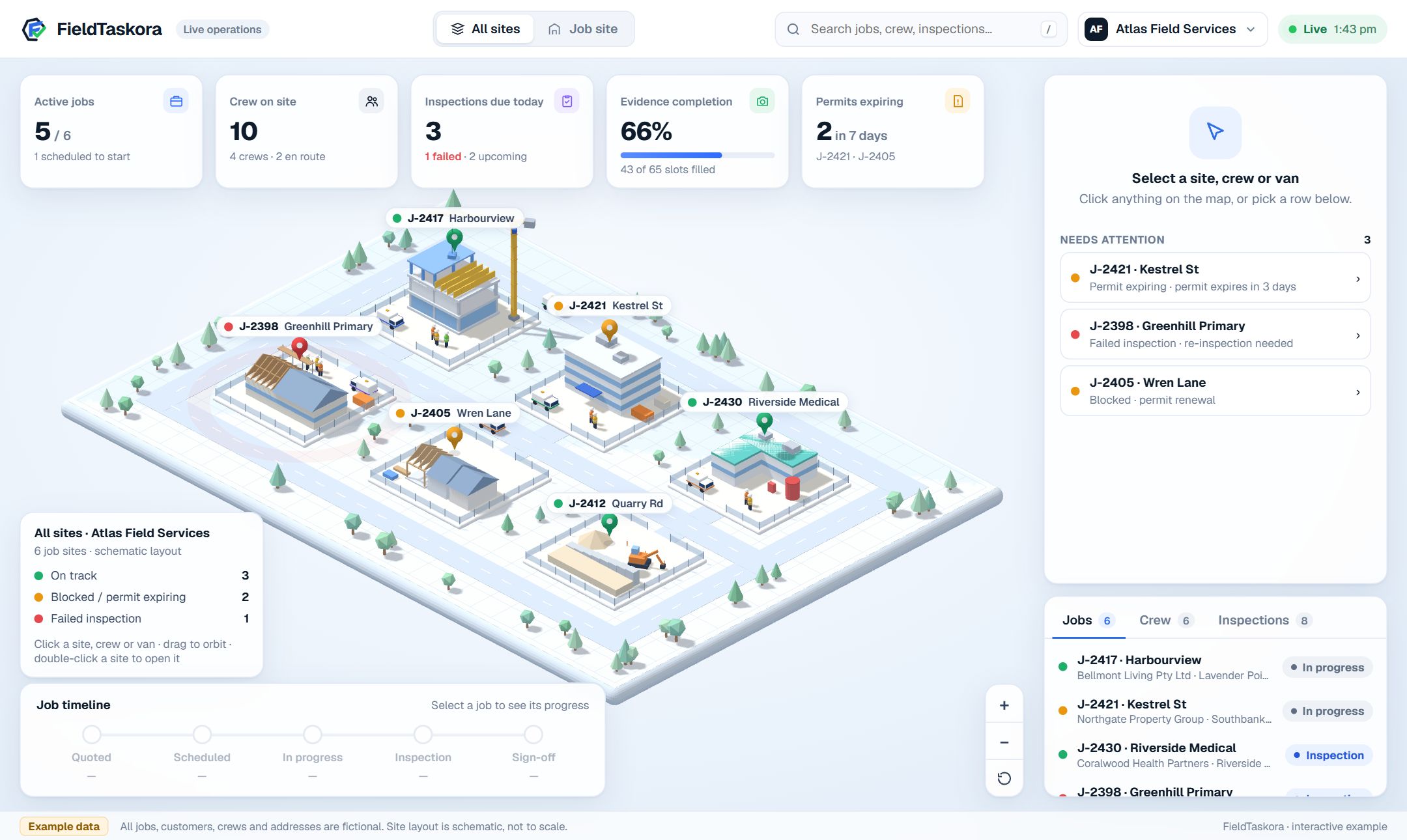
The estimate that wins the job, the field app that does it, and the record that proves it — with every site on one live view. Click a site below to fly in.
Interactive example · fictional jobs, crews and addressesOpen full screen →The interactive version is built for a laptop or desktop screen.
app.fieldtaskora.com
Job boardEstimatesEvidenceSite viewCrewReports
Job boardToday · 5 active
Needs you (2)Greenhill Primary failed its flashing check — book the re-inspection.Wren Lane’s road permit expires in 5 days — the pour is on hold.
Harbourview Residences – Stage 2Formwork Crew AIn progress78%
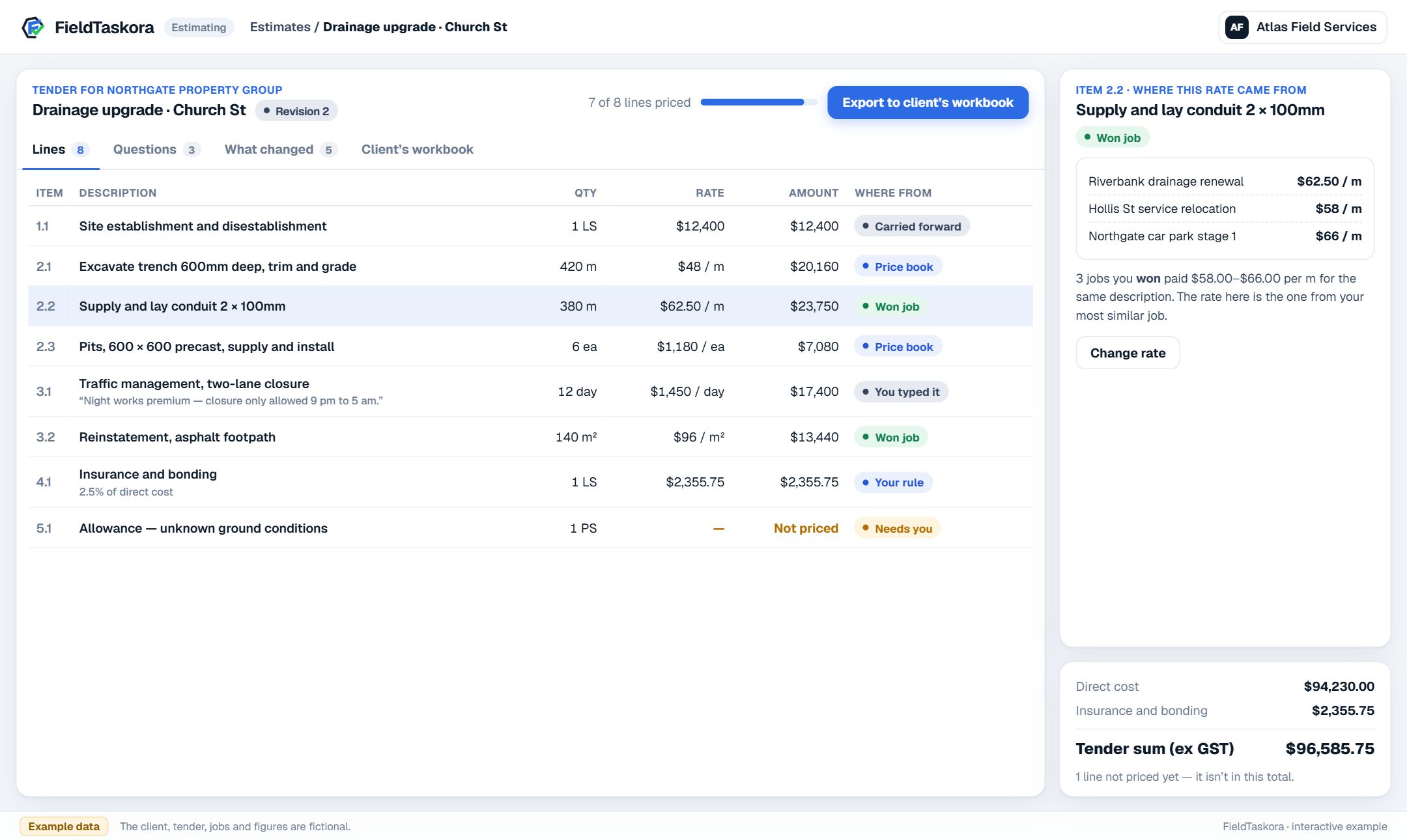
Price the bid, then hand it back in their spreadsheet.
Click any line to see where its rate came from. Price the one that needs you, work through the questions raised from the client’s own documents, and export — your rates go into the client’s workbook with their layout and formulas untouched.
Interactive example · fictional client, tender and ratesOpen full screen →The interactive version is built for a laptop or desktop screen.
app.fieldtaskora.com
Job boardEstimatesEvidenceSite viewCrewReports
Estimate · Drainage upgrade, Revision 2Export to client’s workbook
Site establishment$12,400Carried forward
Excavate 600mm trench$48.00 / mPrice book
Conduit 2 × 100mm$62.50 / mWon job
Traffic management$1,450 / dayYou typed it
Allowance — unknown ground—Needs you
4 of 5 lines priced · 1 needs youEvery rate shows its working
Do the work
Simple enough that the crew actually uses it.
The FieldTaskora field app, on the phone your crew already carries.
Joining Atlas Field Services
Join your crew
Your jobs are on your phone from here. No app store, no password.
Join & start
Sign in on any phone
A mobile number and a PIN. No app store, no password, no training day.
FieldTaskoraRPPit inspection · Church St
Step 3 of 650%
Photograph the pit lid before opening
close-up+
On site · GPS10:42 am
Safety checks
Barriers in placeYesNoN/A
Gas test completeYesNoN/A
“Lid cracked along the north edge.”Voice note · transcribed
Do the job, step by step
Each step says what to do, check and photograph — with location and time attached automatically.
FieldTaskoraRPPit inspection · Church St
Everything’s capturedNothing left for the office to chase.
8 photoslocation and time on every one
Safety checks4 of 4 answered
Voice notes2, transcribed
Sign-offsigned on site
Send the jobNo signal? It queues and sends when there is.
Finish, and it's documented
Everything required is captured before the job can be sent. No signal? It sends when there is.
Capture to record
What happens between the crew finishing and the record existing.
Four stages, and nobody has to do any of them.
01 — Capture
Nobody types the metadata
The crew does the job. The phone in their pocket does the paperwork, while they work.
app.fieldtaskora.com
Job boardEstimatesEvidenceSite viewCrewReports
Arrived from the field · Pit inspectionJust now
TaggedPit lidCrackNo safety issueLocationOn site · from the photo’s own GPSTimeDevice 10:42 am · server 10:42 amVoice note“Lid cracked along the north edge.”DuplicatesNone found
Nobody typed any of this.
What arrives from the phone
Voice notes transcribe themselvesSpoken on site, written up automatically.
Photos are read, not just storedTagged for what is in them, safety issues flagged, duplicates caught.
Location and time arrive on their ownGPS from the photo itself, and the time as both the device and the server saw it.
02 — Connect
It lands against the right job by itself
Every item finds its own place in the record — nobody files anything.
app.fieldtaskora.com
Job boardEstimatesEvidenceSite viewCrewReports
Job boardToday · 5 active
Needs you (2)Greenhill Primary failed its flashing check — book the re-inspection.Wren Lane’s road permit expires in 5 days — the pour is on hold.
Harbourview Residences – Stage 2Formwork Crew AIn progress78%
Everything links to the jobThe asset, the check and the person it belongs to.
Gaps surface the same dayA missing capture is flagged while the crew is still on site.
Exceptions are triaged, not queuedSorted by how serious they are, so the one that matters comes first.
03 — Process
The documents write themselves
The end-of-week paperwork, done before anyone reaches it.
app.fieldtaskora.com
Job boardEstimatesEvidenceSite viewCrewReports
Daily report · Pit inspection, Church StENDEES
Your logoAtlas Field Services
Summary
The crew inspected the pit on Church St. The lid is cracked along the north edge and was photographed before opening. Barriers were in place and the gas test passed. The interior was not inspected — access refused, recorded as a gap.
Steps done6 of 6
Open exceptionsCracked lid
Drafted from what the crew capturedApproved · Hannah Lee
Daily report — written, not typed
Job records and daily reportsDrafted from what was actually captured.
Method statements as branded PDFsGenerated from the job, carrying your branding.
In English, German and SpanishIncluding everything the AI writes.
04 — The record
And it holds up when someone asks
Every record arrives carrying its own proof.
app.fieldtaskora.com
Job boardEstimatesEvidenceSite viewCrewReports
Completion pack · Pit inspection, Church StPDFCSV
Your logoJob 24-118 · Church St
SummaryCoverage
LidBarriersGas testInteriorReinstatedSign-off
Interior: recorded as a gap — access refused, noted on site.Evidence
Signed on site · Riley Park12 files · SHA-256 manifest
Completion pack — with its manifest
Packs with their own proofA coverage matrix and a SHA-256 manifest in every pack.
Media verified on the way inEvery file hashed on upload, so nothing can be quietly swapped later.
Every AI action is accountableMetered, logged and capped per organisation.
Prove the work
From the photo on site to the pack the client signs off.
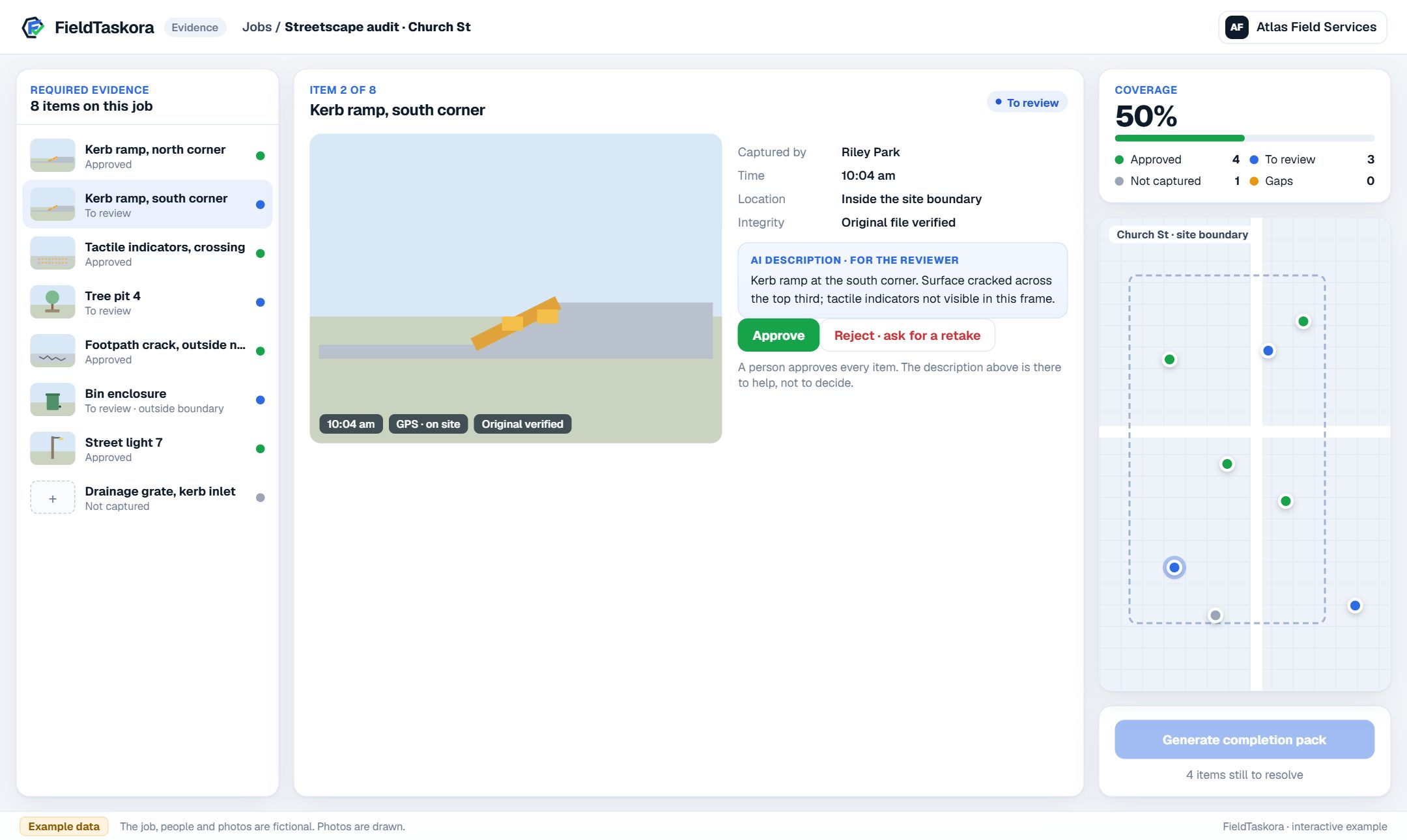
Review each item with its location, time and integrity check. Approve it, or send it back and watch the retake arrive. Record what genuinely can’t be captured as a gap, with the reason — then generate the pack.
Interactive example · fictional job and people · photos are drawnOpen full screen →The interactive version is built for a laptop or desktop screen.
app.fieldtaskora.com
Job boardEstimatesEvidenceSite viewCrewReports
Evidence · Streetscape audit, Church St9 of 12 approved
Site boundary
Kerb ramp, northApprovedGPS · 10:14 am · original verified
Tree pit 4To reviewGPS · 10:14 am · original verified
Footpath crackApprovedGPS · 10:14 am · original verified
Bin enclosureOut of areaGPS · 10:14 am · original verified
app.fieldtaskora.com
Job boardEstimatesEvidenceSite viewCrewReports
Completion pack · Pit inspection, Church StPDFCSV
Your logoJob 24-118 · Church St
SummaryCoverage
LidBarriersGas testInteriorReinstatedSign-off
Interior: recorded as a gap — access refused, noted on site.Evidence
Signed on site · Riley Park12 files · SHA-256 manifest